
How Small Businesses Can Use AI to Improve an Existing Website
Most small business owners are not looking to rebuild their website from scratch. They are looking for a way to make what they already have look more professional, work on mobile, and stop creating a bad first impression when someone searches for the business and clicks through. These are specific, solvable problems – and AI-powered redesign tools have made them considerably faster and cheaper to address than they used to be.
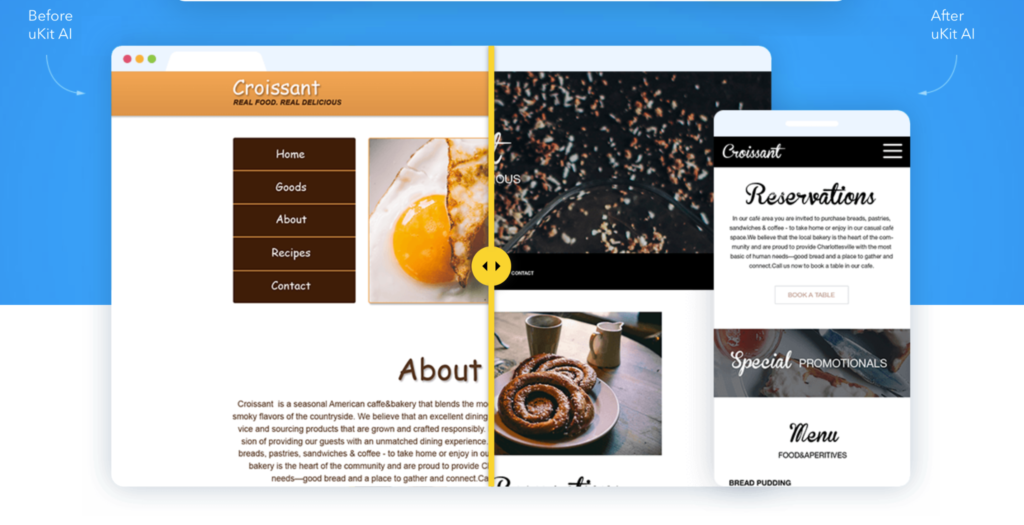
uKit AI is a practical example of this category. You provide a URL to your existing site. The tool analyzes the content and structure, then generates a modernized version – mobile-responsive layout, HTTPS, updated visual conventions, cleaner code – in around ten minutes. You review the output before anything goes live.
This guide walks through the process in the order that actually produces a useful result, including what to prepare before you start and what to do with the site after the AI generates it.
Step 1: Identify the Actual Problem With Your Current Site
Before touching any tool, spend five minutes looking at your existing site the way a new customer would. Open it on your phone. Navigate to the service page. Find the contact information. Try to complete a typical visitor journey – arriving, understanding the offer, deciding whether to reach out.
Write down the three things that frustrate you most. These are your benchmarks. The AI upgrade should address at least the technical ones: mobile layout, HTTPS, visual dating. If the frustrations are more about content – the service description is too vague, there is no pricing guidance, the about page does not say anything convincing – those are content problems that no visual upgrade will fix.
Knowing the difference before you start means you will not mistake a better-looking site for a better-performing one if the underlying content was always the real issue.
Step 2: Prepare a Short Content Audit Before Submitting the URL
AI redesign tools work from what is on your current site. That means whatever is on the page – including outdated information, old service names, and anything that has changed since the site was built – gets carried into the new version.
Before you submit the URL, take ten minutes to note:
Any services you have added or stopped offering since the site was last updated. Any pricing or availability information that is no longer accurate. Whether your contact details, address, and hours are current. Whether the “about” section still describes the business the way you would describe it today.
You do not need to fix everything before running the upgrade – but having this list means you will catch the gaps during the review step rather than publishing inaccurate information in a modern, professional-looking frame.
Step 3: Run the Upgrade and Understand What You Are Looking At
The process is straightforward: submit the URL, wait roughly ten minutes, and review the generated result inside the uKit platform. What comes back is a rebuilt layout with your existing content placed into current design conventions.
The right question at this stage is not “does this look like a custom design?” It is “does this solve the specific problems I identified in Step 1?” Mobile layout: fixed. HTTPS: applied. Visual dating: addressed. The content is the same – presented better.
If the result is close to right, the remaining work is refinement. If the content problems are more significant than you expected, the upgrade has clarified the scope of what actually needs to happen next.
Step 4: Review for Accuracy Before Anything Else
This is the step most people rush past. Read every section of the AI-generated version as if you are checking a document before sending it to a client.
Specifically: are your services described accurately in current terms? Are any prices, hours, or contact details wrong? Does the about section still match how you describe the business today? Is there anything on the page you no longer offer or do differently?
The AI preserved the content of your old site. If your old site had errors, those are now in a much better-looking package. The review step is where a human catches what the AI cannot know.
A common issue is service descriptions that were written when the business had a different focus and never updated. They survive the upgrade because they are readable text, not because they are accurate. Catching this before launch is straightforward. Catching it after a client has already read outdated information is harder.
Step 5: Evaluate the Structure From a Visitor’s Perspective
After accuracy, think about flow. A typical visitor to a small business site arrives with a small set of questions: what does this company do, do they serve my area, can I trust them, and how do I contact them? Walk through the redesigned site with those questions. If any of them take more than two clicks to answer, that section needs adjustment before launch.
The AI applies current layout conventions, which generally produce a more logical reading path than older templates. But “logical by current standards” is not the same as “specifically right for this business and its customers.” A service page that lists capabilities in alphabetical order may follow conventions but fail to lead with the offer most visitors are actually looking for.
This is the kind of structural thinking that has to come from understanding the business. The AI generates a competent default. The review step is where you make it specific.
Step 6: Decide Whether to Launch or Take It Further
An AI-generated upgrade is often a strong enough foundation to publish immediately, with the review corrections applied. In other cases, it reveals that the content needs more work before the site is genuinely useful.
A useful rule of thumb: if the gaps are visual and technical – the site looks dated, does not work on mobile – launch the AI upgrade and refine from there. If the gaps are strategic – the site does not clearly communicate what makes this business worth choosing – address the content first, even if it means a brief delay.
A live, improved site is better than a delayed ideal one. But a live site with weak copy in a modern frame still underperforms, and it looks less like a work in progress and more like a finished statement about the business.
What to Add After the Launch
The upgrade handles the technical and visual baseline. What you build on top of it often determines how the site actually performs for the business.
One of the most consistent gaps in small business websites is the absence of any interactive element that helps visitors move forward without picking up the phone. A pricing calculator, a scope estimator, or a simple tool that helps visitors figure out which service applies to their situation removes the friction between “interested” and “contacted.” If you are thinking about what to add at this stage, the comparison in Best Calculator Builders for Embedded Website Widgets is a practical starting point – it covers the options that are genuinely lightweight enough to embed without slowing down a page that just got cleaned up for performance.
The other addition worth considering is a structured way to collect feedback from visitors. Once the site is live, the most reliable signal about whether it is working is not traffic data – it is what visitors say when you ask them directly. If you are evaluating which tool makes sense for this, whether for client research, visitor surveys, or post-project feedback, the comparison between SurveyMonkey vs SurveyNinja: Reporting, Collaboration and Admin Controls covers the structural differences between the two platforms in detail – which matters when you are choosing something you will use regularly, not just for a one-time form.
The Ongoing Maintenance Question
An AI upgrade is not a one-time fix that lasts forever. The site you publish after a tool-assisted redesign still needs to stay current – updated service information, new client references or testimonials, seasonal content changes, and the occasional structural adjustment as the business grows.
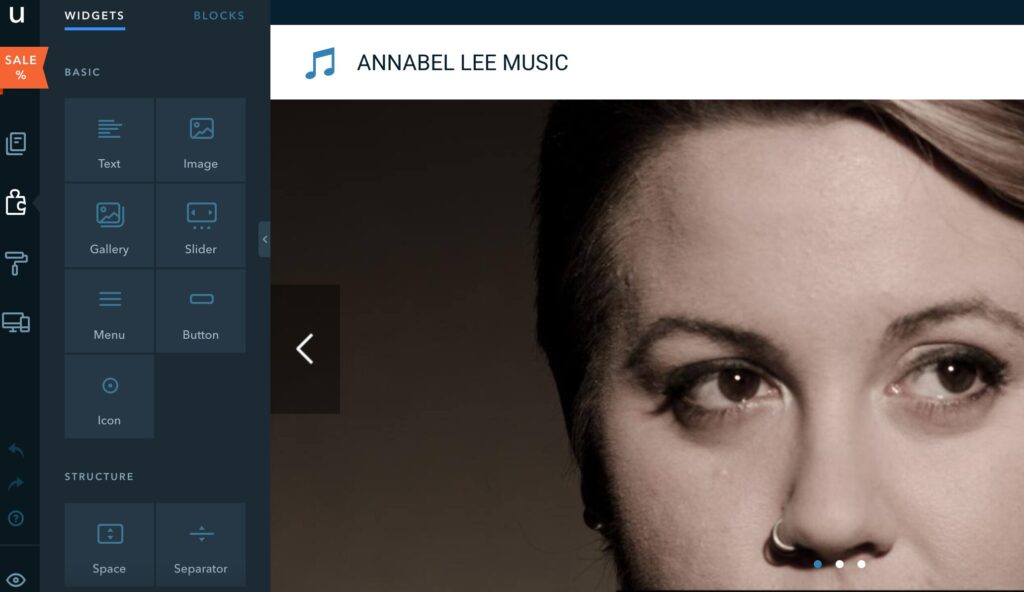
One of the practical advantages of uKit as a platform is that basic content updates do not require technical help. A business owner can update a service description or change a phone number without calling a developer. That manageable editing environment is part of what makes the upgrade a sustainable improvement rather than a short-term fix.
The businesses that get the most long-term value from this kind of upgrade are the ones that treat it as a beginning – a technically current, mobile-ready site they then keep current – rather than a permanent solution that can be left alone for another several years.
Summary
AI redesign tools make a specific set of website problems faster and cheaper to address: mobile responsiveness, HTTPS, visual dating, and basic technical hygiene. They do not solve content problems, strategic gaps, or the question of what makes the business worth choosing. Used with accurate expectations, they compress what was previously a multi-week project into something reviewable in an afternoon – which is a genuine improvement for small businesses that have been putting off a refresh because the process seemed too complicated or too expensive to justify.